
VSCode Walkthrough: Installing OCaml in 1 Click
We are making it easier to get started with OCaml! Tarides dedicates a lot of resources towards improving the developer experience in OCaml, and that includes thinking about how we can reduce friction (and frustration!) for newcomers. Recently, this effort has produced a walkthrough in VSCode for setting up OCaml, essentially a ‘one-click installation’ using opam.
To test it out, install VSCode and the OCaml Platform extension. Having them both installed will automatically open the walkthrough. Should you need to manually open the walkthrough after installing the OCaml Platform extension, start by clicking on the help menu in the top right corner, then select ‘open walkthrough’, and select the one titled ‘OCaml: Setup opam dev environment (manual)’.
Mission
VSCode is by far the most popular editor among beginners, mainly thanks to its helpful UI, which gives users plenty of support: welcome/setup panels, interactive menus, selection tools, and so on. By targeting VSCode first we are making installation easier for newcomers, who are more likely to struggle to set up OCaml. It will also benefit anyone who prefers the VSCode editor and provide maintainers with helpful feedback to improve other workflows.
Our mission at the start of the project was to focus on reducing friction by minimising reliance on the terminal and external setup documentation. One of the earliest pain points when installing OCaml is understanding where to find and install everything you need to get started with writing code. Even if you know where to find everything, it can be challenging to get to it all in the right order. OCaml.org has an installation guide, which is a great resource, but it’s a lot of information to take in and can be hard to parse.
We care about growing the OCaml community, and feedback suggests that installation is a common pain point for newcomers. To improve their experience, we need to ensure that the pathways to installation and setting up projects are smooth.
The Walkthrough
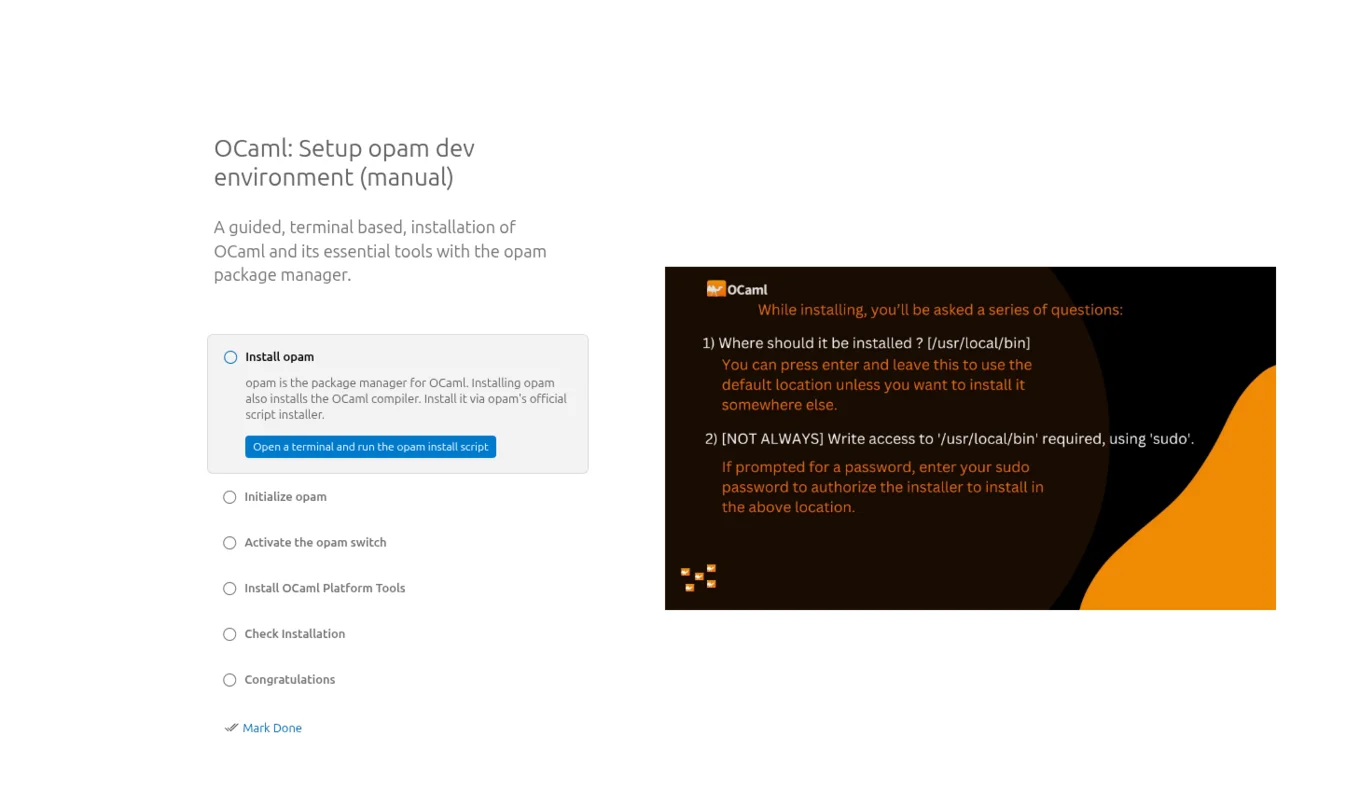
The new VSCode walkthrough opens a window when users install the OCaml plugin. The page guides the user through five steps, providing clear instructions and a UI that indicates when each step is in progress and when it succeeds. When the user clicks on a step, the walkthrough opens an integrated terminal and completes it for them.
The steps are:
- Install
opam: VSCode opens a terminal and runs theopaminstall script. - Initialise
opam: VSCode opens a terminal and runsopam init. Initialisingopamprepares the user’s system to useopamto manage OCaml packages and compilers. - Activate the
opamswitch: This step prompts the user to select and activate theopamswitch. It explains that anopamswitch is an isolated OCaml environment where users can install different versions of OCaml and packages. - Install Platform Tools: The next click installs some key OCaml tools: OCaml LSP for editor support,
odocto generate documentation,ocamlformatto format code, andutopas an interactive REPL. - Check Installation: This step verifies the OCaml installation by running
utop. - Congratulations: Success! OCaml is installed, and users are asked to fill in an optional feedback form.
Here's what the start screen for the walkthrough looks like:
Until Next Time!
There are still things that the team is hoping to iterate on in the coming months. Using the input from the feedback form, the team wants to improve the walkthrough as well as simplify the documentation on OCaml.org to reflect the new changes. Once Dune Package Management has its first full release, the team also plans to create a similar walkthrough for that workflow to support its users.
You can connect with us on Bluesky, Mastodon, Threads, and LinkedIn or sign up for our mailing list to stay updated on our latest projects. We look forward to hearing from you!
Open-Source Development
Tarides champions open-source development. We create and maintain key features of the OCaml language in collaboration with the OCaml community. To learn more about how you can support our open-source work, discover our page on GitHub.
Explore Commercial Opportunities
We are always happy to discuss commercial opportunities around OCaml. We provide core services, including training, tailor-made tools, and secure solutions. Tarides can help your teams realise their vision
Stay Updated on OCaml and MirageOS!
Subscribe to our mailing list to receive the latest news from Tarides.
By signing up, you agree to receive emails from Tarides. You can unsubscribe at any time.